Monday, 9 December 2013

Production Schedule


Back up Locations:

Leicester Square
Regent Street
Bond street

We have recently changed the details, and have changed the locations to Leicester square and covent garden, because there were more telephone boxes  that were closer to the tube/train station. We have also split day one of filming, into two so we could film more shots.


Sunday, 8 December 2013

Recces


 I have taken this photo on Oxford street, red buses are on view, which would tell the audience the location is London. This location is great because it is very busy.  If I edited the video clips using final cut pro, and use the effect colour correction 3 way, I could make the clip darker to add more mystery.


I have edited the same photo, using Photoshop  To show how making the photo darker creates different emotions. Making it darker creates more mystery and uncertainty  because the dark is mysterious we do not know what is in the dark.


This would be really busy, so we will have to do lots of shots of the same shot, in case something other than the telephone box is red. Which would cause a problem during editing. 


We must be careful while in London, because it is very busy. That the camera is always with either me or Sophie. In case it is damaged or stolen. 


This is from the official Westminster website, stating we can film if it does not affect traffic or the public. We should try not to use a tripod, because this may cause disruption to the public. We only  have a few shots on Oxford street so this shouldn't be a problem, if it does we shall move onto anther street which is busy and has telephone box's. Such as Leicester Square.


Lighting for a Thriller

Lighting is very important for a thriller, because it is a big part of creating mystery. Low key lighting is most commonly used in thrillers. We must try to film on a dull and gloomy day, but if for some reason we cannot we will edit on After Effects. On After Effects we can change the brightness and contrast, and add rain and lightning effects. We can still edit with After Effects even if we film on a dull day, we can just add and make it look even more intense. We should not go over the top, so it looks unrealistic. 

Here is an example of what we could do. I have changed the contrast and brightness so it is darker and added rain, using the brightness and contrast effect and the cc rain effect.


Thursday, 5 December 2013

Initial Production Logo's


This logo sequence incorporates the Sun, which ties into the name 'Sun Productions'. It is simple but captures the production company name, the sound track also creates suspense, which ties into our thriller title sequence opening.

I have firstly created a new composition, and imported an image of the sun's surface. I have then used the cc Sphere effect, which created the base of the sun.  Then used the glow effect, and duplicated the layer, making the bottom layer glow threshold higher, so the sides glow further. I pre-composed both sun layers, so I could move them at the same time together. Then I have used key frames to make the sun move towards the screen, and then exit. I have also changed the size, so it got bigger towards the end of the sequence.
I have then chosen my font, Movie Letters, and turned it into a 3D layer, I have also added a camera layer. The camera layer and 3D layer, have allowed me to position the text on a slant.
At this point I wanted the sun to travel over the top of the text, as if the font was in space. I used the pen tool to create a mask around the sun. I then put a key frame here so it would stay. I then moved to the end of the sequence, and moved and re sized the mask. I then went kept going through the sequence, making sure the mask always covered the sun. I then made sure the solid layer I created the mask in was above the text layer. By clicking on the text layer, and changed the Trkmat to Alpha Inverted Matt. 
I added the audio in, and faded the logo in and out as well as the audio.


I have made a simple yet eye catching logo, with a clear title of our production company. 


Firstly I chose a font and drew a line on Photoshop, and then imported that onto After Effects as a JPEG.

I have then used a lens flare, and positioned it at the begging of the line. I have then placed a key frame at zero at the begging of the three second sequence. I then placed it towards the end and changed the 'end' to one hundred percent. 
This is the sound track, which I have made on garage band, and imported onto After Effects.


This production logo is slightly more complex, but still simple so it does not distract from our actual title sequence.


I have firstly drawn masks using the pen tool on a new solid layer, this is how the lines will know were to go. I have then added the stroke effect, and change 'end' to zero at the start, and then one hundred at the end. It now moves.
I repeat this again in another direction. I then add the glow effect, I then adjust this to the correct brightness so it stands out.
I then create a new solid layer, and use the text too to write 'Sun Productions'. I used the pen mask tool again to write over the top of the text. I then use the stroke tool again.
I have then drawn the light bulb,and added the glow tool, making it brighter towards the end of the sequence.
This is the sound track which I have made on Garage Band, and then imported onto After Effects.

Brainstorm


Scene Walkthrough Map Script/Timeline

Red caller walks past a few telephone boxes.

Actor 1 (Red caller) Apply's red lipstick, walks down a busy London street.

Effect/ flashback occurs to show what happened prior the red caller going into the phone box.

Flashback to the woman (Actor 2)
Doing housewife tasks, washing up, tidying, etc. Looks at a picture of her son in a picture frame. Muffled radio sounds in the background.
(Phone placed next to the picture frame)

Back to the present time (Red caller)
Actor 1, continues to walk down the street again. Walking up stairs near South Bank, looking around.

Flashback to the male (Actor 3)
On a train going to work reading a newspaper. Camera pans to the newspaper being placed on to the chair. Hear phone ring and him say hello.

Back to the red caller (Present)
Gets an old phone out of her handbag. Takes out the sim card, snaps/breaks it, puts in bin and puts the phone back into her bag.

Walks to the phone box, dialing number.
Shows a split screen of the male, female and red caller.

Woman - "What no." says words in a screamed voice "When is this going to stop! Is nothing enough for you."

Man- "I told you no more. You're ruining my life."

Red caller drops the phone, starts to laugh.


Costume Design/Character

Actor 1 (The Red Caller)

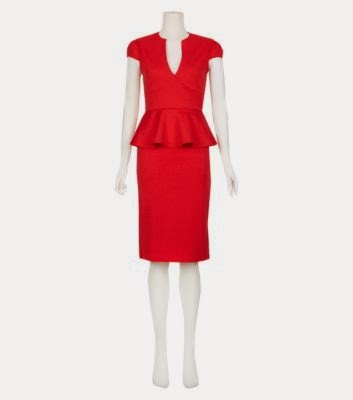
Red dress


Mid heels


Red Coat


Bag


Actor 2 (Male)

Smart clothing/ Business dressed 

Blazers


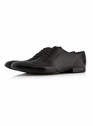
Shoes


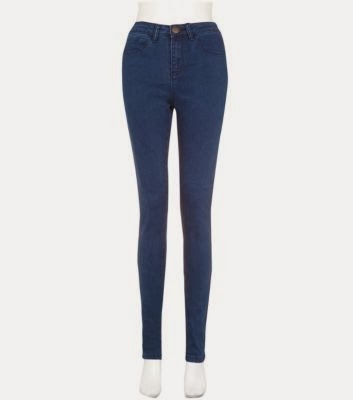
Trousers 


Shirts 


Bags


Glasses (Possibly) 


Actor 3 (Female)

Housewife/ casual dressed 

Tops


Leg wear


Shoes 


Extras
  • Everyday people on Oxford street, South bank, landmarks/streets in London.